
Quiz Marketing: How It Works and How It Helps to Get More Leads
Most marketing funnels break at the same point. You get the click, maybe even a bit of interest, but then the user stalls. Too many options, not enough clarity. Quiz marketing fixes by helping structure the decision process earlier, before users drop off.
In this article, we’ll break down how quiz marketing works, what makes it different from standard lead generation methods, and how it impacts lead quality and campaign performance. We’ll also walk through how to build your own quiz step by step, so you can apply it in practice.
What Is Quiz Marketing?
Quiz marketing is a lead generation strategy that uses an interactive format to engage potential customers in a conversation. On the outside, a quiz looks fun and entertaining, but underneath it’s a tool designed to serve your business goals.
Unlike a boring form (which most people understandably ignore), a quiz engages visitors by offering a valuable reward for answering a short series of questions. In the end, both sides win — visitors get personalized recommendations, often with a bonus (discount, checklist, tailored offer, etc.), while businesses acquire structured lead data: answers that reveal intent, budget, preferences, or readiness to make a purchase.
Here’s why you should try a quiz:
👉 Users finish it because they want their personal result or a promised reward. Conversion rate is likely to reach 30–40%.
👉 An appealing quiz can boost share rate and referral traffic. People love sharing personalized results (”What is your perfect holiday destination?”), and it sparks curiosity in their followers.
👉 When someone submits their contact data, you get a qualified lead (not just an email).
👉 You build trust with buyers when suggesting tailored offers. They feel personal, not generic.
👉 It lowers the barrier to entry. Answering some questions feels easier than filling out a form, there’s no commitment yet.
👉 It works with the same traffic you already have. You don’t need to increase ad spend.
Quiz marketing works at every stage of the funnel. It can introduce a brand, help an undecided buyer make a decision, or re-engage someone who went cold. The format is flexible and businesses can adapt it to their current needs.
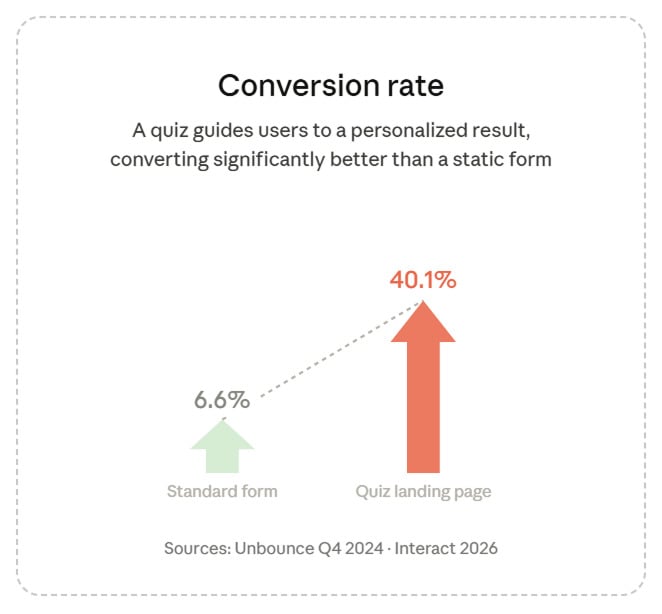
Quiz landing pages convert at 30–40%, while a standard form averages 6.6%. Sources: Unbounce, 2024; Interact, 2026
How Quiz Marketing Works
A quiz moves a potential customer through a structured process, which feels like a natural conversation. The stages of this process form what’s called a quiz funnel. Let’s walk through each of them using a true-to-life example.
The Quiz Funnel Steps
Let’s say you run an online skincare brand. You launch a quiz called “Find Your Perfect Skincare Routine” and run ads to it. Here’s what happens next:
Attraction. A user sees the ad, reads the headline, and clicks because the question feels relevant to them. The goal at this stage isn’t to sell. It’s to get the click with a promise: we’ll help you figure something out.
Engagement. The user answers 5–6 questions: skin type, main concern, budget, current routine. Each answer shapes the next one. Someone with oily skin and a tight budget is guided through a different path than someone dealing with dryness and ready to invest. The quiz adapts and never feels like a generic survey.
Lead Capture. Placing the form before the results tends to generate more leads overall: users have already invested time answering questions and want to see their recommendation, so they’re motivated to share their contact. You can also show the results first and ask for contact details afterward — for example, to send a discount coupon by email. This approach typically produces fewer but more motivated leads.
Conversion. The results page shows a limited set of products matched to the user’s answers, with a short explanation of why they were chosen. A first-time buyer sees a basic kit — a cleanser, a day cream, and a night moisturizer for their skin type. A returning customer with a higher budget sees a premium bundle with a toner, a serum, and a targeted treatment for their specific concern (hyperpigmentation, acne, dehydration, etc.).
Follow-up. Even if they don’t buy right away, you now know their skin type, budget, and concern. That data can be stored in CRM and used for further marketing communication such as email sequences, retargeting ads, or follow-up calls. Every touchpoint after that feels relevant.
Benefits of Quiz Marketing for Business
Quizzes work because they solve problems that standard forms don’t:
Involving and Warming Leads
It all starts with the headline. It speaks directly to a pain point or promises something useful, so the user feels engaged from the very beginning. For example: “Find out why you feel tired all the time”. While answering the questions, they start articulating what they actually need — sometimes for the first time. When they reach the results page, they’re not a cold lead anymore. They’ve already gone through a small journey: I have a problem → here’s how it can be solved → and these people clearly know how to help me.
The same logic applies when there’s no problem to solve, just a desire. Someone wants to buy a home, plan a vacation, or join a gym, but they don’t know where to start. There are too many options, and none of them feel obviously right. A quiz helps them narrow it down using answers about budget, location, lifestyle, and preferences. By the time they reach the results, they’re not just browsing anymore. They’ve made small decisions along the way, and the brand that helped them do that already feels like the right choice.
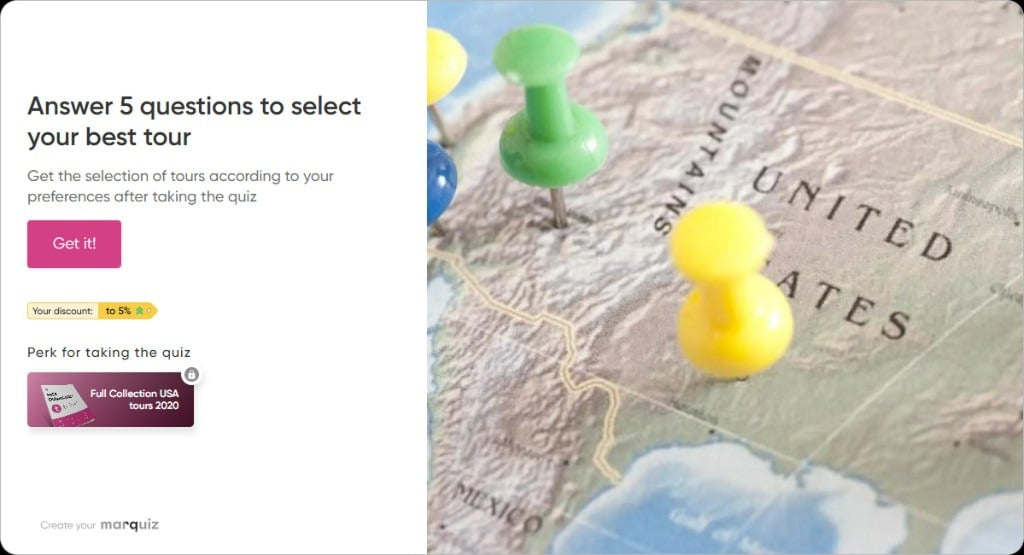
It’s tempting to find out a perfect tour for your budget and preferences
Getting Higher Level Quality Leads
Each completed quiz acts as a pre-qualification layer. Sales teams can filter out low-fit contacts and focus on leads that better match the offer. A quiz can feature questions about budget, delivery timelines, project scope, or specific requirements to filter out casual inquiries and add context to those likely to proceed.
For example, a home renovation service launches a quiz asking about project scope, timeline, and budget range. Someone who selects “small bathroom, flexible timeline, budget under $2,000” is a more promising customer than someone who needs a full apartment renovation within 30 days and for $1000. And those who are not actually interested in renovation won’t complete the quiz at all.
From our work with 1000+ clients, quizzes that include a budget qualification step can reduce low-intent leads by 40–50%, making the sales process significantly more efficient.
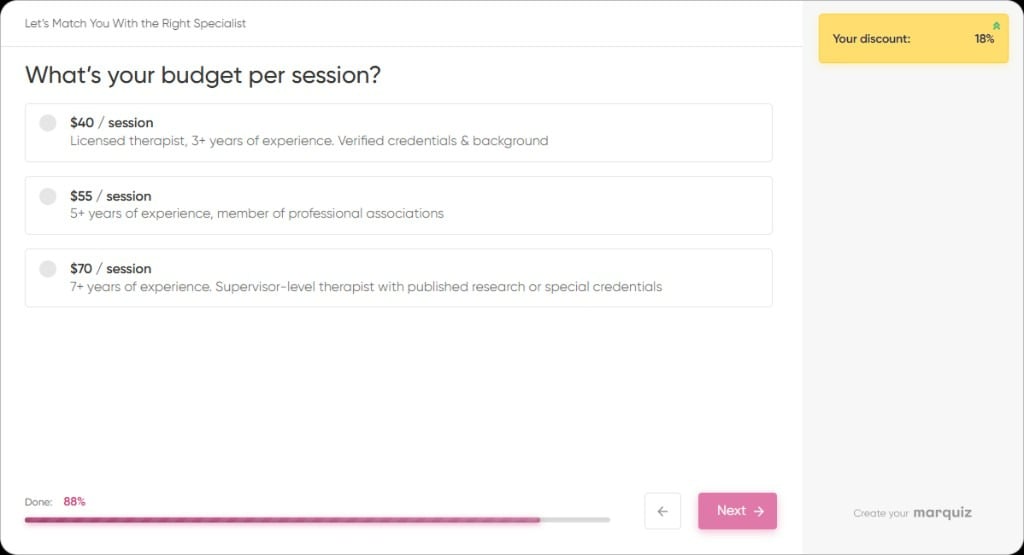
Add a budget-related question to highlight those comfortable with the pricing
Increased Conversion Rates
Quizzes convert better because prospects reach the final stage with clearer expectations and a more relevant offer. Among our customers, there was an e-commerce brand in the home fitness niche. They added a quiz to recommend equipment based on customers’ goals, available space, and budget. Visitors answered questions such as “What is your goal — to lose weight, build strength, stay active?”, “How much room do you have for a home fitness zone?”, “How much are you willing to invest?” After completing the quiz, visitors received just one or two tailored options. The purchase rate tripled within two months (increased from 2.9% to 8.7%).
Better Personalization in Marketing
Instead of sending the same message to everyone, companies can adjust their communication based on the responses they receive. For example, a CRM platform adds a quiz to their pricing page: “Which plan fits your team?” It asks about team size, main use case, and current tools. Someone who selects “5-person sales team, currently using spreadsheets” gets a different follow-up than someone with “50-person marketing team, migrating from Salesforce.” The first lead will receive educational content (how-to guides, onboarding tips, etc.), while the second one will be sent case studies, migration checklists, and an invitation to a demo call.
💡 Marquiz offers more than 300 integrations with various services, allowing you to work with any customer database. Quiz answers automatically sync to your CRM and email tools, triggering the right follow-up without any manual work.
Expanded Social and Viral Reach
People don’t share ads — but they do share things that say something about them. A quiz result works like a personality badge: “Your marketing style is data-driven strategist” or “Your perfect vacation is 10 days in Japan — slow mornings, street food, zero all-inclusive resorts”, and it feels personal enough to post. Friends see it, get curious, take the quiz themselves — and your brand gets in front of a new audience without any extra ad spend.
According to BuzzSumo, an average quiz gains about 107 shares. That may not sound like a lot, but each share puts your quiz in front of a new audience, doesn’t cost you anything, and already has social proof from someone they trust.
Quiz as Content Marketing
Most people don’t arrive ready to decide. Quizzes stand out because they act as content, not just a conversion tool. They replace passive reading with interaction and deliver value upfront. That’s what makes them effective in content marketing: they capture attention and hold it long enough to move users forward.
Here’s how it plays out in real cases:
Case Study 1: Online HR Training Courses
A company offering online HR training courses wanted to increase enrollments in India and the U.S. They launched an interactive quiz, “Receive Your HR Career Development Plan!”, with 8 targeted questions assessing career goals, experience, and HR knowledge. At the end of the quiz, participants received personalized course recommendations based on their answers.
Within three months, the quiz generated over 700 leads with a 36% conversion rate, significantly outperforming their previous lead generation efforts. Its success came from the quiz’s personalized approach, making users feel the training fit their needs.
🎯 700 leads in three months with a 36% conversion rate
Case Study 2: Children’s Online Chess School
StepFuture, an online chess school for kids, wanted to attract more students worldwide. To do this, they introduced quizzes into their marketing strategy, using two different formats: a pop-up quiz on their website offering a 10% discount on subscriptions and a quiz-based landing page for ad campaigns, encouraging visitors to sign up for a free trial lesson.
Each quiz asked a few simple but relevant questions, such as the child’s age, their interest level in chess (casual or competitive), and their preferred schedule for the trial lesson. The goal was to create a personalized, low-pressure flow for parents considering chess lessons for their kids.
The results were significant:
🎯 +15% clients from the pop-up quiz
🎯 +30% clients from the quiz landing page vs. a site without a quiz
The quizzes also lowered the cost per lead compared to traditional website forms and lead-generation ads.
This aligns with what we’ve seen across education niches, where quiz-based landing pages consistently outperform static forms by 20–30%. In both cases, the quiz didn’t bring in more traffic – it simply made existing interest easier to convert by adding structure to the decision stage.
How to Make a Quiz: Step-by-Step Guide
A well-designed quiz is a powerful lead generation tool. But to get desired results, you need to build it the right way. That means having clear goals, structuring it well, and making sure it actually delivers value to both your audience and your business.
Build your quiz now and start turning visitors into buyers!
Marquiz is a platform designed to simplify the process. It gives you all the tools to create interactive quizzes, test different approaches, and even start collecting leads for free. New users get up to 10 free leads in their account, so they can easily experiment, install the quiz, and connect ads.
Here’s a step-by-step guide on how to create a quiz using Marquiz builder:
Step 1: Define Clear Goals
Start by deciding what you want the quiz to achieve. This will determine the questions, logic, and final outcome.
For the customer:
– Save time finding the right products or services
– Get recommendations based on their needs
– Receive useful insights or advice
For the company:
– Collect high-quality leads
– Segment the audience for more targeted marketing
– Test new products, services, or messaging strategies
Each answer in your quiz can help you build a lead scoring system – ranking users by interest level, budget, or intent. High-scoring leads can be passed directly to sales, while lower-scoring ones can enter nurturing campaigns.
By defining your goals upfront, you’ll create a quiz that actually drives meaningful results.
💡 Not sure where to start? Read a free step-by-step guide from the Marquiz team on how to build a reliable lead generation system.
Step 2: Set Up the Start Page
Once you’re in the Marquiz editor, you can create, configure, and preview your quizzes. To sign up, you can register with your email or use the quick sign-in option via Google.
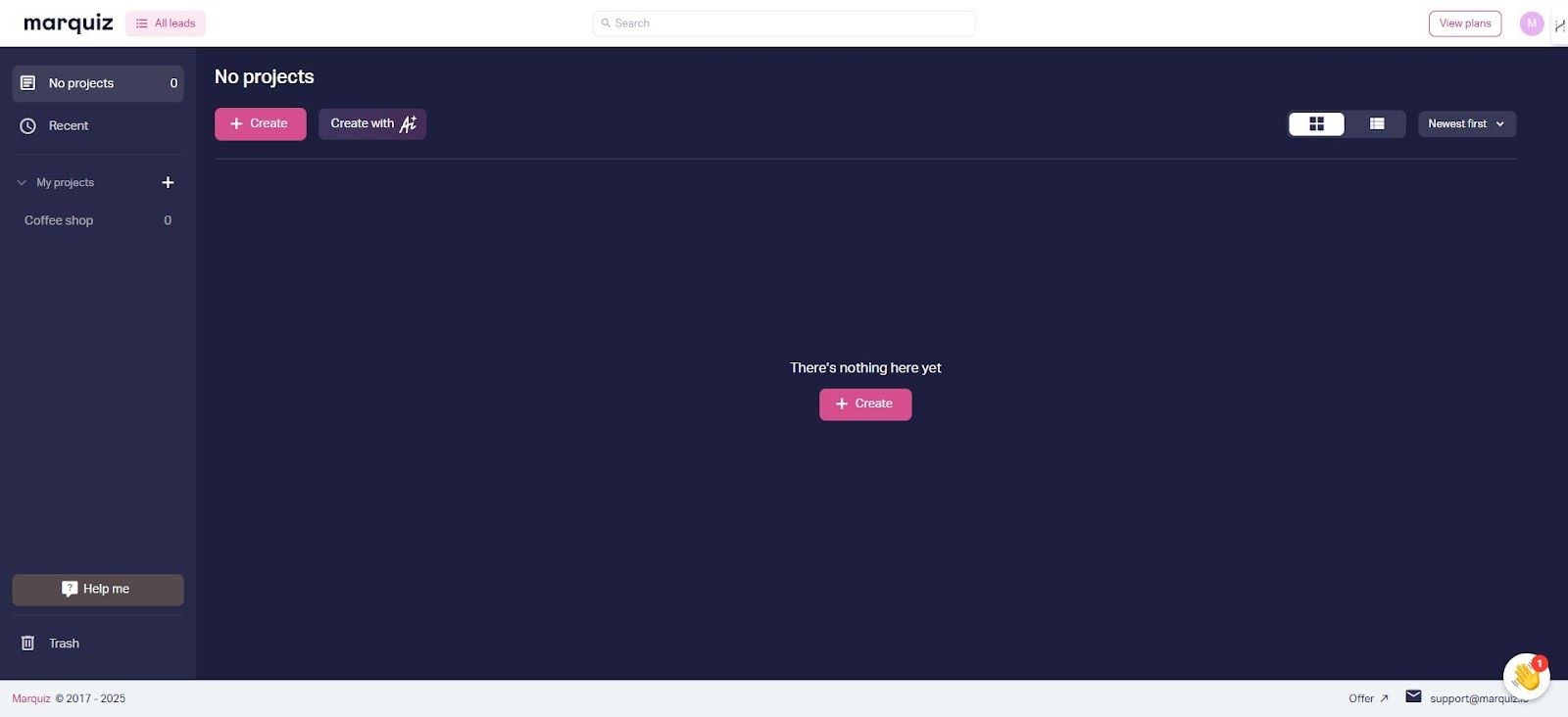
You can start building your quiz from scratch or use a template from the gallery. If you want to speed up the process, you can also use an AI-powered template generator, which will create a structured quiz with relevant questions and an offer within a minute.
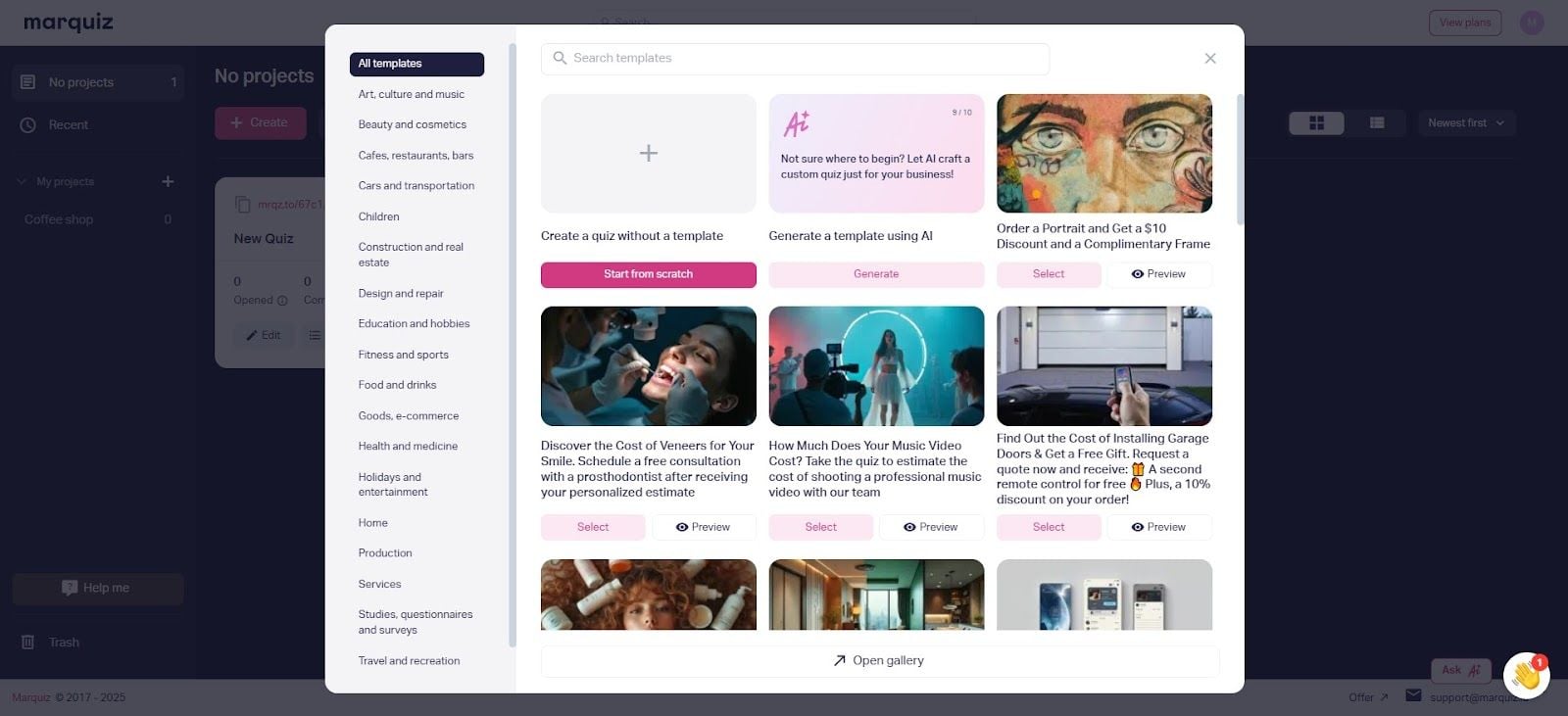
There’s a vast gallery of ready-to-use quiz templates
To make your start page as effective as possible:
– Add an appealing image (from your own files or free libraries like Unsplash)
– Write a clear, compelling headline that explains what the quiz is about
– Use a strong call-to-action button to encourage users to begin
– Include basic business details (phone number, company name, website) for credibility and smoother ad moderation
– Optionally, add your logo and contact info to reinforce trust
– Offer small incentives for completing the quiz – such as a personalized report, free consultation, or exclusive discount
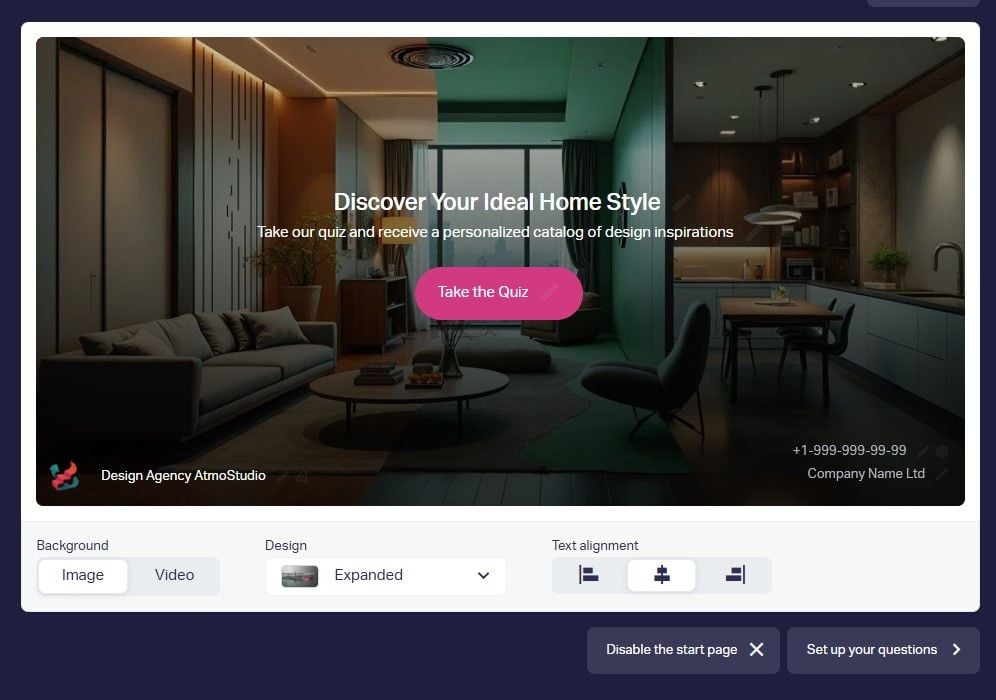
An example of a start page of a quiz
Step 3: Create Questions and Answers
To keep things interesting, mix up the question formats:
– Multiple-choice for quick, simple answers
– Sliders for selecting a preference or level (e.g., budget, experience)
– Image-based answers for a more visual and engaging format
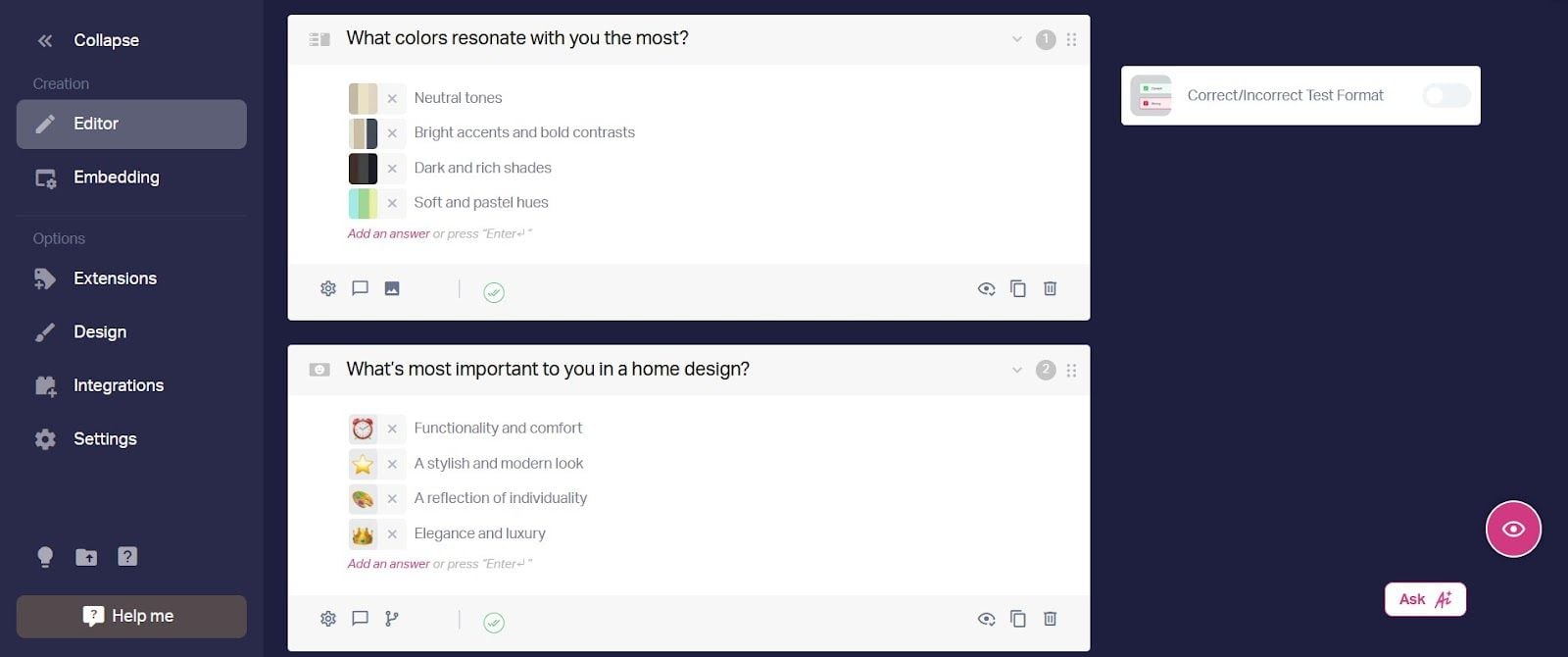
You can use standard questions that managers typically ask new clients
Marquiz provides 12 different types of quiz marketing questions, so you can choose the ones that fit your needs best. You can also add images and icons to make it feel more interactive.
Step 4: Configure the Results Page
The results page is where your quiz delivers value. It’s not just about giving people an answer – it’s about reinforcing your offer and driving action.
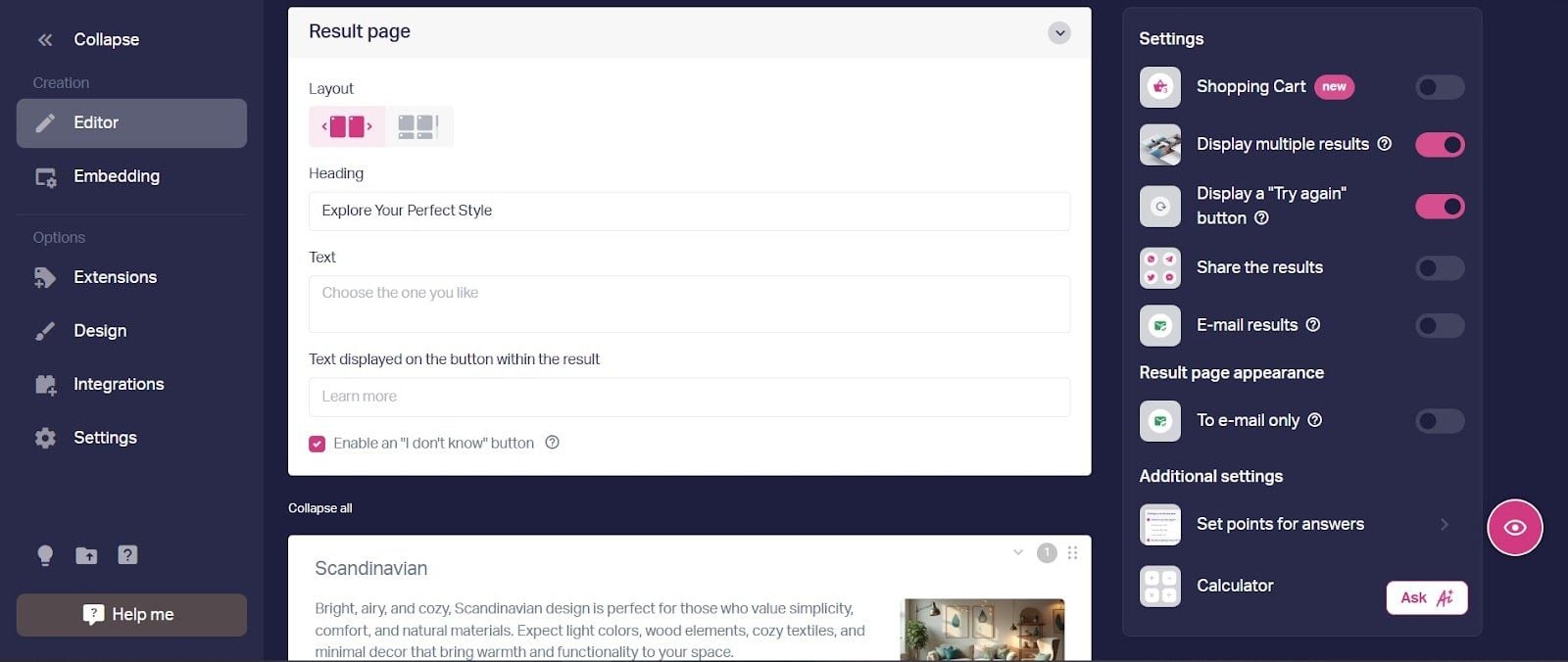
Some ways to optimize your results page:
– Show the result before or after the contact form (whichever converts better for your audience)
– Make the results feel personal – the more relevant they are, the higher the chances of conversion
– Include a special offer like a discount code or limited-time deal to encourage immediate action
– Provide a short explanation linking the user’s answers to the recommended product or service
– Encourage social amplification by making results visually appealing – add shareable images, short summaries, or badges customers can post. Use built-in sharing buttons to expand your quiz’s organic reach
Step 5: Add a Contact Form
This is the part where you collect leads, but it’s also where people are most likely to drop off. Filling out the form shouldn’t feel like too much work. Keep it simple and make it clear why it’s worth their time.
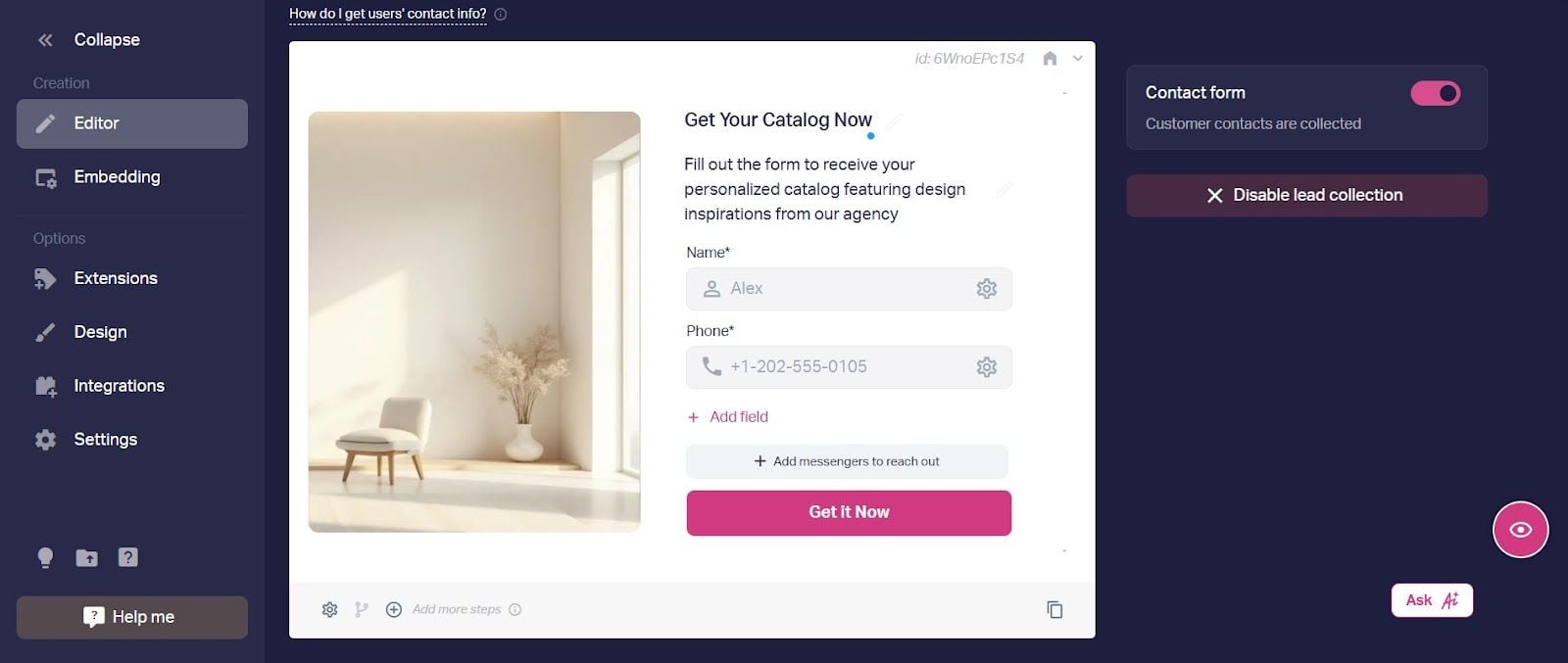
You can offer just messaging options for contact. Typically, people prefer texting over phone calls
Here’s how to make your contact form most effective:
– Keep the offer consistent. If you introduced a special offer or incentive on the start page, mention it again here to reinforce the value
– Clearly explain why users should share their contact info (e.g., “Get your personalized results instantly!”)
– Tell them what they’ll get in return (e.g., “Access exclusive discounts and expert recommendations”)
– Keep it short
– Split the process into two steps: First, ask for contact info; then, if needed, request their name
– Use autofill options to make entering details as easy as possible
Now, your quiz is technically ready to go, but if you want the strongest impact, there’s still something to be done.
Step 6: Fine-Tune Your Quiz
Even the smallest of tweaks can make a big difference in how people move through the quiz and whether they complete it.
Here’s what you can do:
– A/B test different question orders, formats, and images to see what works better
– Analyze drop-off points to find where people are abandoning the quiz. These are usually long text questions, unclear instructions, or too many required fields. Shorten or rephrase those steps to reduce abandonment and provide a higher completion rate
– Refine your call-to-action buttons and offers to make the next step clearer and more appealing
– Adjust the results page so that it better reflects user responses and delivers more useful outcomes
– Customize quizzes to match your brand colors and upload your own themes and fonts
Once you’ve fine-tuned everything, it’s time to share your quiz. You can add it to your website, post it on social media, send it through email, or even embed it in Telegram.
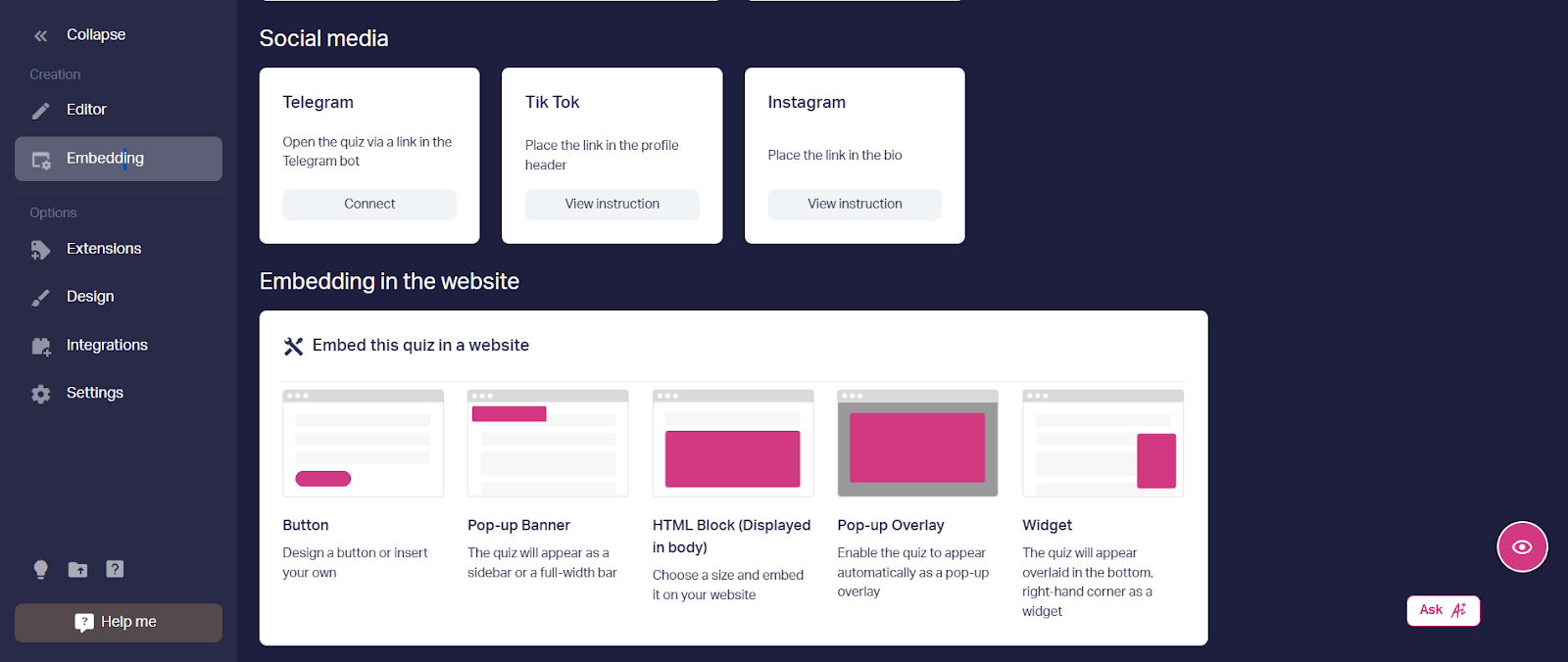
Don’t limit yourself to just one platform – the more places you share your quiz, the better
5 Best Practices for Increasing Conversions with Quiz Marketing
Getting people to start your quiz is one thing. Getting them to finish it and take action? That’s where the real work begins. Here’s what actually moves the needle.
1. Make the Results Worth Finishing For
People need a clear reason to finish the quiz. The final page should give them something genuinely useful, not just a generic “thanks for participating” message or a link to a product catalogue. It can be personal recommendations that solve a specific problem, or an appealing incentive that makes finishing feel worthwhile.
Incentives are one of the key drivers of quiz performance. The desire to receive a discount, a free consultation, or access to exclusive content motivates a user to answer that last question and submit their contact details. Mention the incentive on the start page so users know what they’re getting in the end.
In our experience, overly complex or aggressive incentives reduce trust rather than lead to higher completion, so the offer should stay genuinely useful and straightforward.
💡 Amenari, a wholesale coffee supplier, built a 3-question quiz to qualify B2B leads — asking about order volume, coffee variety, and timeline. To motivate prospects to complete the quiz and leave their contact details, they offered a tasting set at a special price and a free consultation with their head barista. The starting conversion rate was 2.58%. After optimizing the quiz and adding call tracking, it reached 9% on average and peaked at 18% during the best-performing periods.
2. Optimize Your Contact Form
We’ve already covered what makes a good contact form, so now it’s about putting those principles into practice. Keep it simple: ask for only one field and clearly explain what the user will get in return. It can also help to test when you show the contact form. From experience, showing a short outcome first and then offering additional details or bonuses in exchange for contact information tends to work better.
To further reduce hesitation at this point, you can add small trust signals such as “No spam, unsubscribe anytime” or “Join 10,000+ customers.”
💡 A greenhouse company built a 6-question quiz to qualify leads by budget, greenhouse size, and payment method. The contact form asked for just a name and phone number — nothing else. After submitting, users received a personalized selection of greenhouse options, a discount reminder, and a free weed killer as a bonus. The quiz ran on paid social traffic for two months and generated 384 qualified leads.
3. Design for Momentum
Start with easy, visual questions that people can answer in seconds. Save the tougher or more personal ones for later, when they’re already invested. Keep the total to 5–8 questions. A progress bar helps too. “Question 3 of 6” gives users a sense of how close they are to the finish line — and keeps them going. Add “I’m not sure” or “Skip” options for questions that might stump people. A stuck user is a user who leaves.
Avoid monotony. Do not stick to simple multiple-choice questions – mix things up. Try sliders for rating preferences, image-based selections for a visual touch, or ranking options for prioritization. You can even include a few open-ended questions for deeper insights. The more interactive the experience, the more likely users are to stay engaged and complete the quiz.
The most common drop-off triggers aren’t hard to fix — but they’re easy to overlook:
| Mistake | Impact |
| Asking for email too early | Up to 50% drop-off at the first step |
| Too many questions (10+) | Completion rate drops to 15–20% |
| Generic results | Low trust and fewer conversions |
| No clear incentive | Higher abandonment rate |
| Complex contact form | Lower lead capture rate |
Avoiding these pitfalls often has a bigger impact on completion rates than adding new features.
💡 A staffing company launched a single quiz targeting all job seekers with the headline “Work on a rotational basis.” Conversion rate: 1.31%, cost per lead: ~$16. After analyzing responses, the marketer spotted two high-interest segments and built separate quizzes — one targeting women, one targeting poultry plant workers. The results: the poultry quiz converted at 12% with a cost per lead under $4. That’s a 10x improvement in conversion and 4x lower cost.
4. Use Conditional Logic for a More Personalized Experience
A one-size-fits-all quiz can feel generic. Instead, use conditional logic to adjust questions based on previous answers. This keeps the flow focused and ensures users only see what applies to them.
For example, if a person selects “small business,” you can ask about budget and goals. If they choose “enterprise,” shift the focus to integration and scalability. This way your quiz will feel more natural and help them move through it more easily.
💡 A SaaS company ran two quizzes simultaneously — a simple one on their ad landing page (business type, transaction volume, contact details) and a more structured one on their main website, where the key question “Where does your sale take place?” branched into different paths depending on the answer: e-commerce site, courier, vending, CRM, or transport. Each path ended with a personalized result showing a relevant solution, exact pricing, and a 20% discount offer. The structured quiz generated 3x more actual sales — from the same type of traffic.
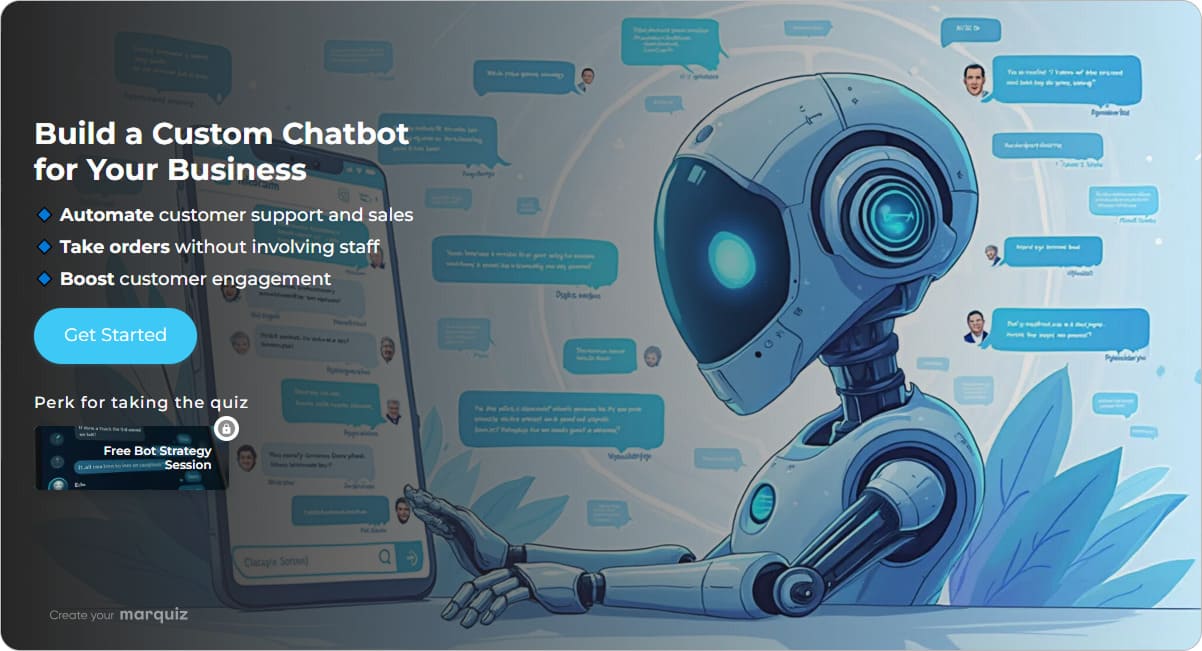
Use quiz branching to guide the user to the most relevant solution
5. Track Performance and Continuously Improve
A quiz is not a set-it-and-forget-it tool, so regular analysis is essential. After launch, the real work begins: reviewing where users drop off, what questions slow them down, and which elements aren’t converting. Monitor key metrics such as completion rates, lead volume, and average completion time to understand how visitors move through the quiz.
Pay attention to drop-off points. If a large share of users leaves at a specific question, it may be confusing, too personal, or unnecessary, and should be revised. You can also experiment with different elements, such as question order, contact form placement, or wording. Simple adjustments, like rephrasing “Enter your email” to “Get your results,” can noticeably increase the overall performance over time.
💡 A real estate developer launched a quiz to generate leads for a new residential complex. Initial conversion rate: 0.18% — well below expectations. After enabling Marquiz’s built-in analytics, the team identified three problems: only 20% of visitors who opened the quiz clicked “Start,” 30% dropped off at the budget question, and the contact form converted at just 1%. They made three targeted fixes: removed distracting elements from the start page, removed the budget question entirely, and replaced the standard contact form with a messenger-based option (phone or WhatsApp). Six weeks later, conversion had grown from 0.18% to 5%.
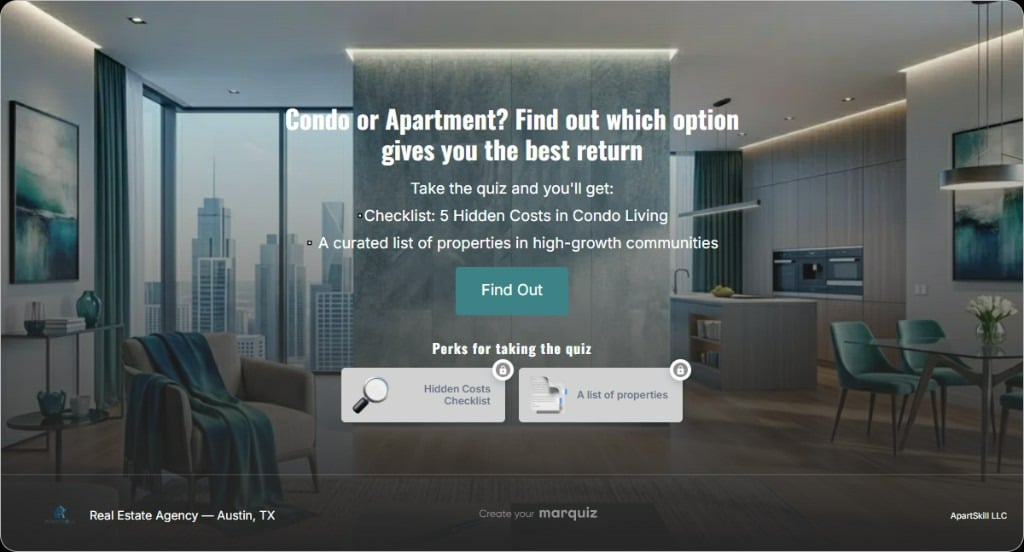
A cluttered start page may become a major dropoff point
Using Quiz Data for Segmentation and Personalization
Quiz responses tell you a lot about your leads — their goals, budget, needs, and preferences. But this data is only useful if you act on it. Here’s how quiz responses can work in your marketing.
Automatic Segmentation
Quiz data allows you to automatically group leads based on their answers. You can separate contacts by experience level, budget, goals, or readiness to purchase. For example, users who indicate they are just starting out can be placed into an educational segment: email sequences, webinars, how-to guides. Those ready to invest get directed toward more advanced offers: a demo call, a tailored proposal, or a fast-track consultation. This way every lead gets the right message at the right moment.
Personalized Email Flows
Quiz answers make email segmentation automatic. If someone’s goal is to improve English for work, send them business writing tips and negotiation phrases — not travel phrases. Use these answers to trigger conditional email sequences: beginners get foundational content, high-intent leads get course recommendations and offers. You set the rules once, and the sequences run on their own without manual sorting.
Lead Scoring for Sales
Not all leads are equal, and quiz answers make that visible. Assign points to responses that signal buying intent — someone who says “need a solution within 30 days” scores higher than “just exploring.” Someone who selects a premium budget range scores higher than someone who picks the lowest tier. Your CRM tallies the scores automatically. Hot leads go straight to the sales team; everyone else enters a nurturing sequence until they’re ready.
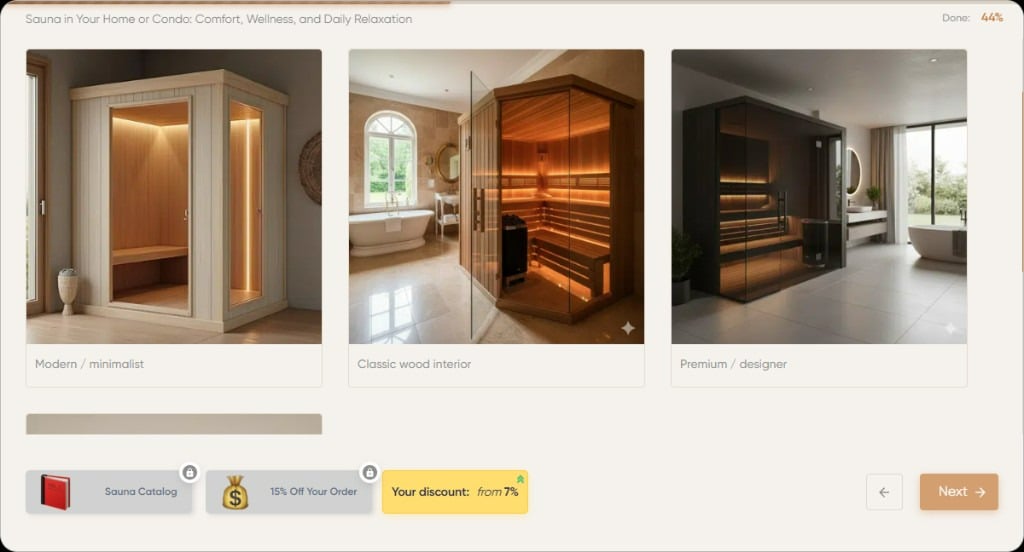
Users who select premium design will score higher than those preferring minimalism
Using Quiz Insights
Quiz data can shape your broader strategy. If 60% of respondents select “limited budget,” that’s a signal to introduce a more affordable tier or a starter package. If one segment converts significantly better than others, it makes sense to prioritize it in your ad targeting. Over time, quiz responses can become one of the most reliable sources of feedback about what your audience actually needs.
Shareability and Viral Potential
If you work in B2B, social shares probably aren’t your main metric. But if your niche is beauty, fashion, education, or lifestyle — social sharing can become a meaningful traffic source on its own. A quiz that gets shared works like a referral: someone you’ve never targeted sees a result, gets curious, and comes to you on their own. Here’s how to design for that.
Make Results Worth Sharing
The results that travel furthest are the ones that feel accurate and a little surprising. Personality-type results (“You’re a Creative Innovator!”) consistently outperform generic product recommendations (“Here are some products”) because they reflect something about the person, not just their purchase intent. Design result cards that look good on a phone screen — clear layout, bold key phrase, minimal text. If the result looks like something worth posting, people will post it. Ugly results stay private.

Users are likely to share something that reflects their personality
Remove Friction from Sharing
Add social sharing buttons directly on the results page with pre-written text and hashtags. Instead of making users write their own post, give them something like “I’m a Strategic Thinker! What’s your type? #TakeTheQuiz”. One tap should be all it takes.
Leverage Social Proof
Partner with influencers or brand advocates to take your quiz and share their results. Their followers see it, get curious, and come to you on their own.
💡 A tattoo artist partnered with other masters who shared her quiz link in their Stories. The quiz calculated the cost of a tattoo and let visitors book a consultation directly. The campaign generated 90 leads and 35 paying clients — bringing in roughly 7x return on her ad spend over three months.
Track What Works
Not every quiz goes viral, and that’s fine. Track your share rate, see which result types spread furthest, and use that data to shape the next quiz. If personality results travel and product recommendations don’t, that’s a signal worth acting on.
Key takeaways
📌 A quiz is a conversation, not a form. It moves users toward a decision by helping them articulate what they actually need before you make an offer.
📌 Lead quality matters more than lead volume. A well-designed quiz filters out low-intent contacts automatically, so your sales team spends time on people who actually fit.
📌 Personalization is what makes it work. Generic results and one-size-fits-all questions kill conversion. The closer the quiz feels to what the user came for, the better it performs.
📌 Small changes have outsized impact. Removing one confusing question, rephrasing a CTA, or adding an incentive can double your completion rate — without touching the ad budget.
📌 A quiz is never finished. Track drop-off points, test variations, and keep iterating. The best-performing quizzes are the ones that get refined over time.